

Every few weeks another video model lands with a launch post claiming it beats everything. The interesting question is almost never "is it the best?" — it's "what does this let me do that I couldn't do last month?" This MiniMax H3 review is written for that second question, and it comes with an answer you can act on today: H3 is now live in the Oxava studio.
There's one concrete thing it does that nothing else in our catalog does. MiniMax H3 is the only 4K AI video model in the Oxava catalog — its 2K and 4K tiers go where every other model in the picker stops, at 1080p or 720p. It also takes up to nine image references in a single generation and exposes a setting no other model on the platform does. And it arrives with a few asterisks most of the launch coverage skated past: an arena result thinner than the headline suggests, a "4K" figure that deserves explaining, and a license that treats some countries very differently from others.
Update · 27 August 2026: A day after this review went up, MiniMax's step-up model in the same family — H3 Max — went live on Oxava too. This post-trained version follows the prompt noticeably more closely and generates faster, but two things covered below exist only on H3: the 2K/4K tiers and nine image references. Neither replaces the other: reach for H3 when you need the highest resolution or several references, and for H3 Max when prompt adherence and speed matter most. H3 Max is on launch pricing until 1 September; the current credit cost is shown on its model card in the studio.
What MiniMax H3 (Hailuo 3.0) Actually Is
Start with the naming, because it trips people up constantly. Hailuo is MiniMax's video product line. H3 is its third generation. That's why the same model shows up as "Hailuo 3.0" in consumer coverage and "MiniMax H3" in developer docs — one model, two labels. Its direct predecessor is Hailuo 2.3, released on October 28, 2025. And to kill a persistent search-suggestion ghost: there is no Hailuo 2.5. If you've seen it referenced, it isn't a released model.
The rollout ran fast. MiniMax previewed H3 at WAIC on July 17, 2026, opened it to
general availability on July 31, 2026, and published open weights to Hugging Face
(MiniMaxAI/MiniMax-H3) and ModelScope on
August 3, 2026 under a document called the MiniMax H3 Community License. Three
weeks from stage demo to downloadable weights is unusually aggressive for a frontier
video model.
Architecturally, two of MiniMax's four named components explain the model's odd edges. H3-VAE, the tokenizer, is credited with a large gain in effective sequence length — that's what buys the longer, denser context, alongside a Contextual Omni Representation layer that compresses source material into something the generator can actually attend to. (The third piece, the H3-Omni Transformer, splits understanding from generation workloads; MiniMax claims roughly a 30% gain in end-to-end training efficiency from that split, which is a vendor claim rather than a verified measurement.) The fourth, In-Context Regeneration, re-renders a lower-resolution output against the original multimodal context so fine detail survives being scaled up. Hold on to that last one — it's the honest explanation of the resolution headline.
The Resolution Story — Including the Asterisk
This is H3's strongest concrete argument, so let's be precise about it.
In Oxava, H3 offers four resolution tiers: 480P, 768P, 2K and 4K. Nothing else in the video catalog goes past 1080p — FLUX.3 and Seedance 2.0 top out at 1080p, and most of the rest at 720p. If you need a clip that holds up on a large screen, in a pitch deck rendered at full width, or as source you'll crop into during the edit, this is the card that gets you there.
Now the asterisk, straight from the model's own hosted schema: 480P and 768P are native generation modes, while 2K and 4K upscale a 768P base result. So the 4K you get is a high-quality regeneration of a 768P render — that In-Context Regeneration stage doing its job — not a frame the model painted at 4K from scratch. That matters if you're comparing against a camera original or planning heavy post work on fine texture. It doesn't make the tier useless: a context-aware upscale is genuinely better than a generic one and the extra pixels are real. It just isn't magic.
One deliberate choice on our side: Oxava defaults H3 to 768P, even though the upstream default is 2K. We didn't want anyone landing on the most expensive tier by accident on their first generation. The panel shows the live credit cost as you change settings, and moving up a tier is one click once you've decided the shot is worth it.
What the Arena Results Do and Don't Say
The most-quoted evidence for H3 is a set of Artificial Analysis arena placements published on August 3, 2026:
| Category | H3 placement | Elo | Nearest comparison |
|---|---|---|---|
| Video editing | #1 | 1130.25 | Gemini Omni Flash at 1121.85 |
| Text-to-video | #2 | ~1239–1242 | Gemini Omni Flash at ~1244–1245 |
| Image-to-video | #3 | — | Behind both Seedance 2.0 and Gemini Omni Flash |
Read the shape rather than the ribbon. H3's clear win is video editing — the category where its multimodal conditioning does something structurally different from a generate-only model. In text-to-video it sits a couple of Elo points behind Gemini Omni Flash, which is a statistical coin-flip, not a defeat. In image-to-video it genuinely trails, and to MiniMax's credit the company acknowledges the gap itself.
And the caveat that should travel with every one of those numbers: MiniMax has not published a numerical quality table disclosing its comparison set, sample counts, or confidence intervals; this is a single third-party arena run, it is not peer-reviewed, and overlapping confidence intervals should not be read as a decisive win. An arena is a snapshot of human preference across a prompt mix that may or may not resemble your work. It's a useful signal, not a verdict. For the head-to-head that matters most here, our Gemini Omni review covers the model H3 is measured against in all three of those rows.
Two honest notes for anyone eyeing the open weights. They're much bigger than the marketing implies: MiniMax sells H3 as a "33B" model, while an independent teardown measured the full inference stack at roughly 69.2 billion parameters and 134+ GiB of weights — a server-class problem, not a workstation one. And the license carries a geography clause, requiring official permission for local deployment in the United States, the European Union, the United Kingdom and South Korea over copyright-related regulatory uncertainty (reported by SCMP on August 4, 2026). Paid API access is globally unrestricted, so that restriction has no bearing on using H3 in Oxava — the studio runs through the hosted API, not local weights.
MiniMax H3 in the Oxava Studio
Here's the click path.
- Open the Oxava studio and switch to the Video tab.
- Open the model picker. Models are grouped by the lab that built them; scroll to the MiniMax group — it's new, joining Bytedance, Kling, Google, xAI and Black Forest Labs.
- Pick the card. It's labelled MiniMax H3 and badged New.
- Choose your mode. Text-to-video or image-to-video. There's no separate "reference" tab — see the next section for why.
- Set duration: 5 to 15 seconds, whole numbers only. No 7.5-second clip, no decimal timing to match a music bed.
- Set resolution: 480P, 768P (default), 2K or 4K.
- Pick an aspect ratio — in text-to-video only: 21:9, 16:9, 4:3, 1:1, 3:4 or 9:16. In image-to-video the selector doesn't appear, because the output ratio comes from your source image. More on that trap below.
- Set prompt expansion if you want to — the four options are explained below.
- Watch the credit cost in the panel. It updates live as you change duration, resolution and reference count, so you always know what you're about to spend.
Plan access, stated plainly: MiniMax H3 is available on Pro and above (Pro, Pro+ and Premium). On Starter the card is visible but locked, with a lock badge and an upgrade hint — you'll see it in the picker, you can't generate with it. We'd rather show you the lock than hide the model.
Reference-to-video happens automatically
This is the part worth internalising, because it works differently from everything else in the studio. In image-to-video, the moment you add two or more reference images the request is routed to H3's reference-to-video endpoint automatically. One image is a normal image-to-video generation. Two or more is multi-reference conditioning. You don't switch modes; the mode switches itself.
The ceiling is nine reference images. One scope note, because we'd rather you hear it from us than discover it: H3 upstream also accepts reference video and reference audio files. We deliberately left both out of the Oxava integration — on this platform you condition H3 with images only.
First-and-last-frame is supported
Supply an opening frame and a closing frame and H3 builds the path between them; there's no separate card for it, the end frame rides along inside image-to-video. Reveals, transformations and product state changes land far more consistently with both ends pinned than with a text prompt hoping for the right conclusion.
Prompt expansion — a setting you haven't seen here before
H3 is the first model in Oxava that exposes its prompt-expansion behaviour to you directly. Four options:
| Setting | What it does |
|---|---|
| Off | Your prompt is used verbatim — no expansion. |
| Fast | Light expansion, returns in about a second. |
| Balanced | The model decides per request (default). |
| Quality | Up to 30 seconds; richest, most detailed prompt. |
Prompt expansion does not affect the price. Nothing here costs credits, so choose on craft grounds alone. The practical advice: if you've already written a detailed, deliberate cinematic prompt — camera move named, lighting specified, pacing set — choose Off, or the model will rewrite your intent into its own phrasing. If you're arriving with a one-line rough idea, choose Quality and let it do the work you skipped. Balanced is a sensible default for everything in between.
About audio — the precise position
H3's headline feature in the wider coverage is native stereo audio generated in the same pass as the picture. Here is the exact state of things in Oxava, and we'll be careful with the wording because it's the easiest thing in this article to get wrong: none of H3's three hosted endpoints expose an audio parameter. There is no audio toggle on this card, and no way for you to direct, adjust or guarantee a soundtrack. We won't tell you it ships sound, and we won't tell you it renders silent — neither is something we can promise you.
What we can promise: if a controllable audio track is part of the deliverable, H3 is not the card to pick. The Seedance 2.0 family and FLUX.3 both generate sound with the picture, with no audio surcharge on either. Choose H3 for resolution and reference consistency, and pick your soundtrack model deliberately.
What It Costs, in Credits
Rates are per second of output, so a 15-second clip costs three times a 5-second one at the same tier.
| Resolution | Per second | 5 seconds | 10 seconds | 15 seconds |
|---|---|---|---|---|
| 480P | 5 credits | 25 credits | 50 credits | 75 credits |
| 768P (default) | 6 credits | 30 credits | 60 credits | 90 credits |
| 2K | 13 credits | 65 credits | 130 credits | 195 credits |
| 4K | 16 credits | 80 credits | 160 credits | 240 credits |
Reference images are priced separately and gently: the first five are free, and each additional image costs 8 credits. At the nine-image ceiling that's a maximum of 32 credits added to the generation — and most jobs never get near it.
Read the table and one workflow falls out of it immediately: 2K costs more than twice 768P, and 4K nearly three times. That gap is the entire argument for the loop below.
How to Actually Prompt MiniMax H3
Specs tell you what's possible; prompting decides what you get.
Call your references by number
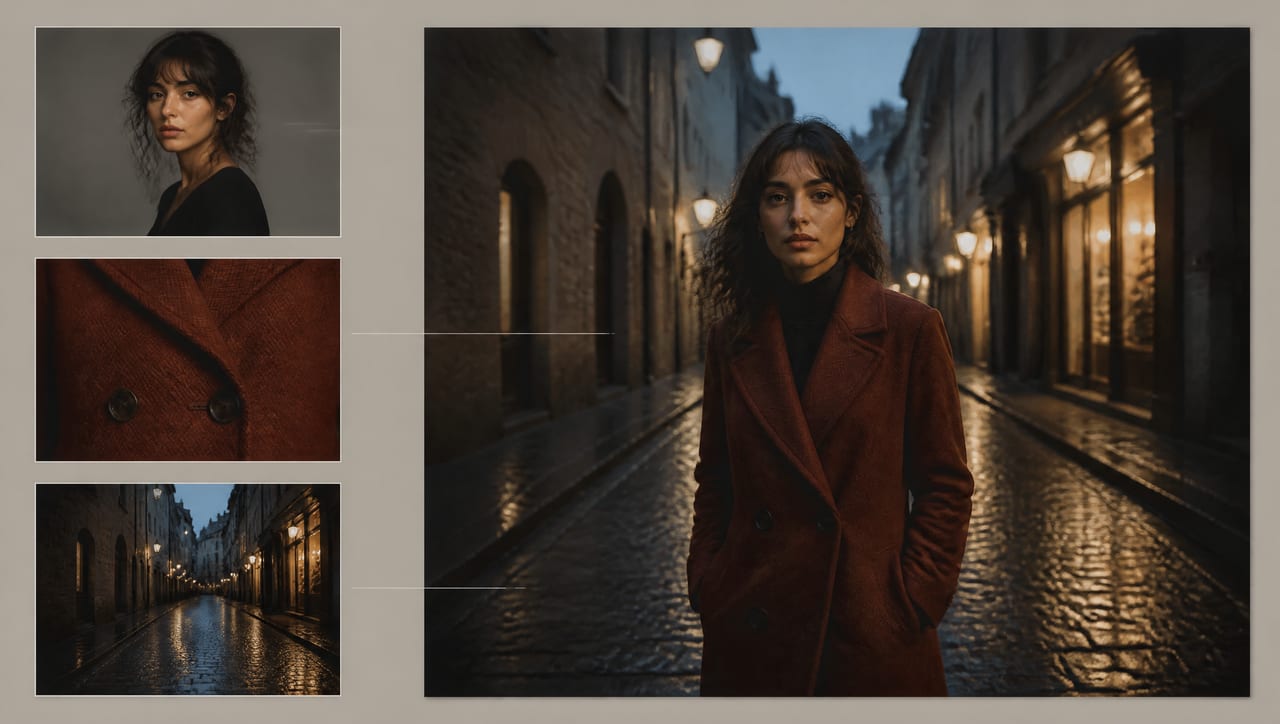
This is the single most useful thing in this article, and almost nobody mentions it: H3 refers to your reference images by their position in the list, as "Image 1", "Image 2", and so on. You address them in the prompt by number. If you upload a character portrait, then a fabric close-up, then a location still, those are Image 1, Image 2 and Image 3 — and the prompt can assign each a job.
Here's a skeleton to adapt. Upload in this order, then paste and edit:
Image 1 is the character — keep her face, hair and proportions exactly as shown. Image 2 is her coat — match the colour, weave and button detail precisely. Image 3 is the location — match its architecture, surfaces and time of day. Action: she walks slowly toward camera through the location in Image 3, wearing the coat from Image 2, one continuous movement that completes within the clip. Camera: a slow dolly back at chest height, single continuous take, no cuts. Light and grade: warm practical light from the shopfronts, cool blue evening ambience, shallow depth of field, subtle film grain. Do not: change the wardrobe, add other characters, add on-screen text, or cut to another angle.
Four things make that work. Every reference is given exactly one job — identity, detail, place — so nothing competes. Continuity language comes before change language ("keep exactly as shown" precedes the action), or the model will happily restyle your references while animating them. One action, one camera move, because scripting three beats into a single generation is the fastest route to incoherent output in any model. And an explicit "do not" list, which is cheaper than regenerating.
Budget your nine slots — and usually stop at five
Nine is a ceiling, not a target. Every reference is an instruction, and contradictory references produce muddy output. A stack that behaves usually looks like this:
- 1–3 identity images — the character, product or location, from consistent angles. More angles of one subject is good; several different subjects in one stack is where drift starts.
- 1–2 detail images — the wardrobe, the finish, the label, the texture you can't afford to have reinvented.
- 1–2 location or style images — grade, palette, lighting register. Pick frames that agree with each other; a moody blue night still and a bright airy daylight still will fight.
That's four to six files doing distinct jobs, which lands inside or barely past the free five — and it's more reliable than nine files arguing with each other.
The aspect ratio trap
The six-ratio selector only exists in text-to-video. In image-to-video the output ratio comes from your source image, and in reference mode the model adapts to the references. So if you're producing for Reels, TikTok or Shorts, you can't fix it after the fact by picking 9:16 — there's no picker to pick it in. Start from a vertical source image. Generate or crop your still to 9:16 first, then animate it. Our vertical video format guide covers why vertical needs to be composed for rather than cropped into.
Find the shot at 768P, then buy the resolution
This is the cost discipline that makes H3 affordable, and it's why our default sits where it does. Iterate at 768P until the composition, camera move and reference behaviour are right. Only then re-run at 2K or 4K. Everything you're actually testing — does the prompt produce the shot you meant? do the references hold? — is fully visible at 768P.
If that loop sounds familiar, it's the same shape as FLUX.3's Draft mode workflow: prove the idea in the cheap tier, pay frontier rates only for the take you already know works. One caveat carries over too — there's no seed control on H3, so a re-run at 4K is a fresh take of the same idea rather than the same frames at higher fidelity. What survives the jump is composition, camera behaviour, pacing and your prompt language. If a specific look has to be locked before motion enters, generate that hero still as an image first and feed it in as a reference.
The underlying craft here isn't H3-specific — camera language, lighting language and pacing transfer across every model in this generation. Our guide to prompting AI video generators is the foundation that skeleton sits on, and it's worth reading properly once rather than pattern-matching templates forever.
Honest Limits Worth Knowing
- No seed control. No generation can be reproduced frame for frame.
- No multi-shot sequencing. One generation is one continuous take. If your concept needs several cuts inside a single run, Kling v3 has a multi-shot switch and is the better routing choice.
- No video-to-video editing. H3's arena win is in the editing category, but that capability isn't part of this integration — you can't feed it an existing clip to revise. Gemini Omni Flash is the card in our catalog that edits video you already have.
- No audio control, as covered above.
- No reference video or audio — image references only in Oxava.
- Whole-second durations only, 5 to 15.
None of that makes H3 a weak model. It makes it a model with a shape: pick it for resolution, for multi-image consistency, and for pinning both ends of a shot. Pick something else when you need sound you can direct, an edit of existing footage, or a clip longer than fifteen seconds. To see where it sits against the field before you choose a default, our text-to-video model comparison lays this generation out side by side, and our Grok Imagine Video 1.5 review covers another prominent 2026 launch if you're weighing that one too.
Open the Oxava studio, find the MiniMax group in the video picker, and run one prompt at 768P before you spend anything on 4K. Twelve video models now sit in the same picker, so choosing the right one for a shot costs you a click instead of another subscription.
Frequently Asked Questions
Is MiniMax H3 the same thing as Hailuo 3.0?
Yes. Hailuo is MiniMax's video product line and H3 is its third generation, so "MiniMax H3" and "Hailuo 3.0" refer to the same model — you'll see the product name in consumer coverage and the model name in developer documentation. Worth clearing up at the same time: there is no Hailuo 2.5. The direct predecessor is Hailuo 2.3, released October 28, 2025, and the line went straight from there to H3.
MiniMax H3 vs Hailuo 2.3: what actually changed?
H3 is a rearchitecture rather than a tuning pass: a new tokenizer that sharply increases effective sequence length, a transformer that separates understanding from generation workloads, a compression layer that makes rich multimodal conditioning practical, and a regeneration stage that enables the high-resolution tiers. Day to day, that shows up as far broader reference conditioning — up to nine images in a single prompt in Oxava — and resolution tiers beyond what the 2.3 generation offered.
Is the 4K output real 4K?
Not natively, and the model's own hosted schema says so: 480P and 768P are native generation modes, while 2K and 4K upscale a 768P base result. The upscale is context-aware — it re-renders against the original multimodal context rather than stretching pixels — so fine detail and small text survive far better than with a generic upscaler. It's a high-quality result and the extra pixels are real. It just isn't a frame the model painted at 4K from the start.
Does MiniMax H3 come with sound on Oxava?
There is no audio control on this model. None of H3's three hosted endpoints expose an audio parameter, so the card has no audio toggle and you can't direct, adjust or guarantee a soundtrack — we're not going to claim it ships sound, and we're not going to claim it renders silent. If a controllable audio track is part of what you're delivering, use the Seedance 2.0 family or FLUX.3 instead; both generate sound with the picture and neither charges an audio surcharge.
Which Oxava plans include MiniMax H3?
Pro and above — Pro, Pro+ and Premium. On Starter the card appears in the video picker but is locked, with a lock badge and an upgrade hint, so you can see it without being able to generate with it. FLUX.3 Draft remains the video model open on every plan including Starter, if you want to run a cheap exploration loop first.
Is MiniMax H3 open source — can I run it myself?
Not straightforwardly. The weights are on Hugging Face and ModelScope, but the MiniMax H3 Community License requires official permission for local deployment in the United States, the European Union, the United Kingdom and South Korea, citing copyright-related regulatory uncertainty. Two practical facts matter as much as the license: an independent teardown measured the full inference stack at roughly 69.2 billion parameters and 134+ GiB of weights despite the "33B" marketing figure, and the native generation modes are 480P and 768P — the higher tiers depend on the regeneration stage. Paid API access is globally unrestricted, which is why none of this affects using H3 in Oxava.
The Bottom Line
The most interesting thing about MiniMax H3 isn't the leaderboard placement. It's the architectural bet: widen the conditioning surface so a generation can be steered by a stack of images rather than a paragraph, and treat high resolution as a context-aware regeneration problem instead of a bigger canvas. That bet is what gives Oxava its first video card past 1080p, and what makes nine-image consistency practical in one prompt.
It also arrives with real asterisks. The 4K tier upscales a 768P base, by the model's own account. The "33B" figure is roughly half the real inference stack. The arena result rests on a single non-peer-reviewed run with overlapping intervals. And on this platform there's no audio control, no seed, no multi-shot and no video editing — image references only.
Adopt it with your eyes open and it earns its slot: reference-conditioned, high-resolution shots no other card in the picker can produce. Find the shot at 768P, name your references by number, describe one action and one camera move, then buy the resolution once you already know the take works.
Open the studio, scroll to the MiniMax group, and spend 30 credits finding out what your idea looks like in motion — then decide whether it deserves 4K.
Oxava Team
Egemen Küpçü is the founder of Oxava, with 10+ years of hands-on experience in 3D and visual production. He writes about the craft of generating product, brand and campaign visuals with AI.
Related Articles
ALL POSTS


Subscribe to our newsletter
Be the first to hear about new techniques, model updates and ideas on AI generation.