
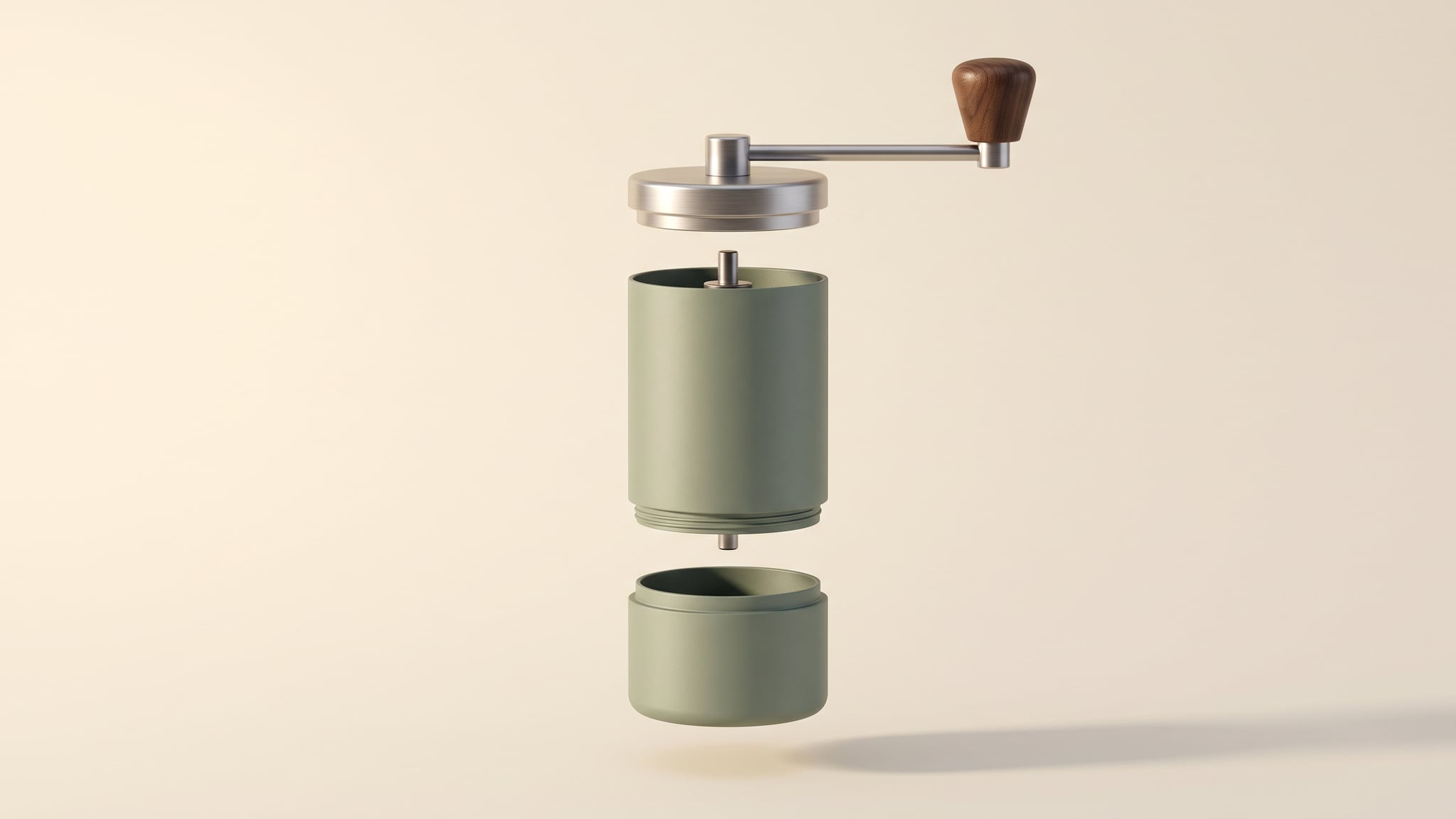
AI exploded product views can make an object feel understandable in a single frame. A convincing illustration can also introduce an unsupported bearing or gear. Before choosing a generator, decide whether the image is a fictional design concept, a factual view of removable parts, or an explanation of the real internal assembly.
The useful question is: what evidence supports each part and relationship the viewer will see? An exterior photo may establish the casing while leaving the mechanism completely undocumented. More polished rendering does not close that gap.
This guide proposes a decision tree, a short component record, and three comparison briefs for one fictional hand grinder. They are production-planning tools, not results from a model test or an automated Oxava verification feature. Use the broader AI product photography workflow for the surrounding creative process.
The cover is a conceptual AI-generated illustration. The grinder and all briefs below are hypothetical; neither the image nor these examples document a real product's construction. Sources checked on October 26, 2026.
Choose the job of AI exploded product views
An exploded view separates components visually so their relationships can be inspected. A cutaway reveals an interior by removing or opening part of the outer shell. Both can communicate construction, even when the original request was simply “make it look premium.”
Write the intended takeaway before production:
- Design concept: “Explore a possible appearance for an imaginary object.”
- Product explanation: “Show which real components this SKU contains or which parts are removable.”
- Technical documentation: “Identify parts or communicate a verified assembly or service procedure.”
These jobs need different evidence and reviewers. A fictional mood image leaves room for invention. A customer-facing explanation of a real grinder's burr assembly makes a factual product statement. A service diagram has an additional procedural purpose that a beautiful image alone cannot establish.
The distinction is visible in CAD workflows. Autodesk Fusion's transformation documentation describes moving selected components by distance or angle, and separating existing assembly levels with automatic or manual explode tools. The tool operates on the components in the design; the documentation does not describe discovering a real object's hidden assembly from its exterior photograph.
Similarly, Onshape's exploded-view documentation describes moving assembly instances and recording editable translation or rotation steps. A controllable arrangement is useful, but the team still has to establish that its source assembly matches the product and revision being sold.
Treat that last point as a separate approval. A precise rendering of yesterday's prototype can still misrepresent today's retail unit.
Connect every component claim to evidence
Start with a proposed view, then list what it would communicate. Include relationships and material claims alongside part names. A metallic-looking ring can suggest a material; a bearing floating on a central axis can suggest its position inside the product.
Use one compact record per significant component or relationship in an external document or spreadsheet:
- Part or relationship ID: a stable reference your team can retrieve.
- Intended claim: what the viewer should understand.
- Evidence: the relevant photograph, technical document, or CAD revision.
- Coverage and unknowns: what that source actually establishes, and what remains unresolved.
- Decision and owner: allowed depiction, hold reason, and person responsible for clarification.
For the fictional grinder, an entry might read:
CUP-01: Show the grounds cup as a separate component. Sources: current cup photographs and the product owner's confirmation that this revision has a removable cup. Allowed: a separated-parts still. Unresolved: the removal movement, so no procedural animation is approved.
A second entry could be:
BEARING-01: Show an internal bearing and identify its material. Source: exterior hero photo only. Coverage: none for this claim. Decision: hold the internal depiction; request the correct technical source from the product owner.
These entries deliberately have different outcomes. The unknown bearing should not block a useful photograph of the cup. Equally, approving the cup should not silently approve the rest of an imagined mechanism.
Our inference is straightforward: a plausible image of a familiar product class does not verify the hidden structure of a particular SKU. A model can draw something mechanically recognizable while depicting the wrong product.
There is also a documented model limitation to consider. Google DeepMind's Nano Banana 2.1 model card, published October 6, 2026, lists hallucinations, spatial-localization confusion, and limits in advanced 3D reasoning and factuality. That is a statement about that model, not an error-rate measurement for every generator or a test of this workflow.
Keep a source usable for review even when it is not an input to the generator. Conversely, uploading a technical image does not establish that every resulting component will remain faithful to it.
Use an evidence-to-route decision tree
Follow these branches for the requested asset. If the brief changes from an appearance study to a factual mechanism explanation, run the decision again.
1. Is the subject fictional, or does the image explain a real SKU?
For a fictional object, use an AI concept route and keep the fictional context with the asset. Decide whether the goal is silhouette, material direction, or composition; avoid unnecessary technical labels that make the picture resemble validated documentation.
For a real SKU, continue to the evidence question. Calling the production method “creative” does not remove the product statement made by the finished image.
2. Do you have evidence for every part you plan to reveal?
If the source set only shows the outside, keep the image within that coverage. Choose an exterior product visual or pause the internal reveal while obtaining appropriate sources. Repeated generation is a way to obtain another candidate, not a way to confirm an undocumented bearing or gear.
If you have photographs of the actual removable parts, consider a real-photo arrangement or a composite assembled in an external image editor. Preserve the photographed components and their identifying details. Record whether the spacing is merely presentational or communicates a verified relationship.
You can explore a clearly bounded concept or surrounding-scene candidate in Oxava Studio using a supported reference workflow. Keep the component record and factual review outside the generation step. Background exploration should not become an invitation to redesign the product.
3. Does the brief depend on hidden geometry or an exact relationship?
Use current manufacturer technical material and an appropriate technical illustration or CAD workflow. Match the assembly to the SKU, revision, configuration, and requested view. If those are unresolved, hold that view rather than borrowing a similar model's internals.
CAD is a route for controlling the geometry supplied to it. It does not establish that the file is current, that materials match the retail item, or that a marketing statement follows from the design. Assign those checks to the relevant product or engineering owner.
4. Will the result tell someone how to assemble, remove, or service parts?
Route instructions through qualified technical review using the product's approved documentation process. A sequence of attractive separation movements is not automatically a valid procedure. Even verified geometry needs a separate check of the intended instructions and their context.
If the need is only an exterior movement, use the separate product rotation reference guide. Rotation coverage and exploded assembly evidence are different production problems; neither validates the other.
Compare three briefs for the same fictional grinder
Imagine a matte-green manual coffee grinder with a crank, body, lid, and grounds cup. The following scenarios change the available evidence and intended use, not the attractiveness of the desired finish. All decisions are hypothetical.
Brief A: a design concept for an imaginary range
Request: explore a calm campaign composition with the outer sections floating apart. The grinder does not correspond to an available product, and the image will appear in a clearly identified design-concept presentation.
Available evidence: an original design brief defining the intended colors and broad appearance. There is no claim that the internals reproduce a manufactured assembly.
Route: AI concept illustration. Keep the composition focused on the design question instead of filling the empty space with invented screws, seals, or part labels. Review whether the final asset still reads as the planned fictional concept.
Decision: proceed within that context. If someone later wants the picture for a real SKU's product page, hold that reuse and review it as a new request. Concept approval does not become product approval when the file moves folders.
Brief B: explain the actual removable grounds cup
Request: help a shopper recognize the cup as a separate component. In this hypothetical scenario, the product owner has confirmed the correct retail revision and provided clear photographs of the body and cup.
Available evidence: the actual components' appearance and documented removability. The sources do not establish the hidden burr assembly or a step-by-step removal procedure.
Route: photograph the verified components in a separated arrangement, or preserve them in an external composite. Limit the picture to the documented cup and body. A generous gap can improve visibility without requiring an invented interior.
Decision: review the final still against those sources. If a candidate adds an internal ring, rework or replace that candidate; do not add the ring to the component record as though generation had discovered it. Hold any requested removal animation until the movement has its own evidence and review.
Brief C: explain the internal mechanism and assembly
Request: reveal the shaft, bearing arrangement, burrs, and their relationships, with part names for a technical document.
Available evidence: the same exterior and cup photographs from Brief B. Those sources leave the proposed internal arrangement unresolved.
Route: hold production of the internal view. Request current technical source material and establish the correct revision with the product owner. Then use a suitable CAD or technical illustration process, with the qualified review required for its intended use.
Decision: the exterior product image can remain available for its already approved job. The internal diagram stays on hold. A small “concept” label would not turn invented bearings beside a real SKU into supported evidence of its construction.
For a related distinction between visible form and documented function, see the electronics product-photo guide. Here, the disputed claim is inside the product rather than at its connector face.
Review the still before adding motion
Compare the selected still with the original sources and component record. Review the intended message first, then individual details:
- Scope: does the image stay within its approved concept or factual purpose?
- Identity: are the required components present once, with the correct appearance and revision?
- Relationships: are position, orientation, and any implied connection supported?
- Unknowns: has the image introduced hidden parts, materials, or capabilities that remain undocumented?
- Presentation: do cropping, reflections, or shadows hide a mismatch or suggest another component?
- Labels: do names and callouts match the approved record and point to the intended part?
A defect needs a specific decision. Missing evidence means hold the view. Reliable evidence with an altered component means rework or replace the candidate. A correct master with a misleading caption means repair the presentation and review it again. These are proposed working states, not technical certification.
If motion is necessary, define what moves and what the movement is allowed to imply before requesting it. A decorative separation can be mistaken for an assembly sequence. Keep a technical procedure in its approved documentation route.
Review the complete resulting clip at normal speed and inspect the movement in an external player or editor. Check for a part appearing twice, disappearing, changing shape, passing through another part, or reconnecting differently. Beginning and end frames alone do not settle what happens between them. These are review criteria, not failures observed in a test for this article.
An accurate still is a useful starting asset, but every retained frame and any procedural meaning need their own review. Do not approve motion solely because it preserves the still's overall color and silhouette.
Keep the decision with the published asset
Add final part names and callouts in an appropriate external design tool, using the approved record. Treat a change to a label's target as a factual revision, even when the typography stays identical. Preserve an unlabelled master when useful, alongside the approved labelled version.
Before release, record:
- Exact SKU, revision, and configuration, or the explicit fictional concept identity.
- Source references and the claims approved for this view.
- Final image or clip version, reviewer, decision date, and unresolved exclusions.
- Destination, accompanying caption, and the context required for permitted reuse.
Then check the actual placement. A concept explanation visible in a presentation may disappear when the image becomes a cropped product-gallery tile. Review that new placement before reuse. Keep customer-facing factual pictures out of a concept folder's automatic publishing path.
The SKU catalog quality-control workflow covers broader master-to-destination tracking. Use this component record to resolve the narrower question first: what is this exploded view allowed to show?
For useful AI exploded product views, make the evidence determine the production route. A fictional concept, a verified parts photograph, and a technical assembly image can all be valuable when each serves the right job.
Open Oxava to explore your next bounded concept or visual setting with suitable references. Keep real product claims tied to current sources, and approve the finished asset in the context where people will see it.
Frequently Asked Questions
Can AI create an accurate exploded view from one product photo?
An exterior photograph does not document the hidden parts of that particular product. AI may produce a convincing arrangement, but compare every factual component and relationship with product-specific evidence before using it to explain a real SKU. If that evidence is missing, change the brief or keep the image as a clearly fictional concept.
Do I need CAD for every exploded product image?
No. Photographs of verified, removable parts can support a separated-parts composition when you preserve their appearance and avoid implying an unverified assembly sequence. Detailed internal mechanisms or technical documentation need appropriate manufacturer sources and qualified review; an approved CAD assembly is one possible starting point.
Can I use an AI exploded image in assembly instructions?
A visually plausible result is insufficient for instructions. Route that work through the product's technical documentation process, using current source material and a qualified reviewer. A CAD model also needs revision and procedure checks before its images are treated as instructions.
Does a concept label make invented internals suitable for a product page?
The surrounding context still matters. A picture beside a real SKU can imply that the pictured mechanism, material, or part is included. If that central message is unsupported, remove or replace the depiction instead of relying on a small concept caption.
Should I animate an exploded view before checking the parts?
Review the still first so that obvious identity and evidence problems do not enter the motion brief. Then review the complete resulting clip separately: parts, connections, and implied movement can change between otherwise convincing frames. Approval of the still does not approve the animation.
Oxava Team
Egemen Küpçü is the founder of Oxava, with 10+ years of hands-on experience in 3D and visual production. He writes about the craft of generating product, brand and campaign visuals with AI.
Related Articles
ALL POSTS

Subscribe to our newsletter
Be the first to hear about new techniques, model updates and ideas on AI generation.