
AI product video accuracy includes how a product works. A lamp can keep the correct silhouette throughout a clip while lighting up before anyone touches its switch. A charging dock can look convincing while its indicator claims a charging state that the real device does not use. Attractive motion does not establish correct operation.
For lamps and electronics, review the relationship between power, control, action, and response. This guide gives you a practical approval template for that relationship, plus hypothetical examples and starting prompts. It is an editorial workflow, not a benchmark or a report of tested generation results.
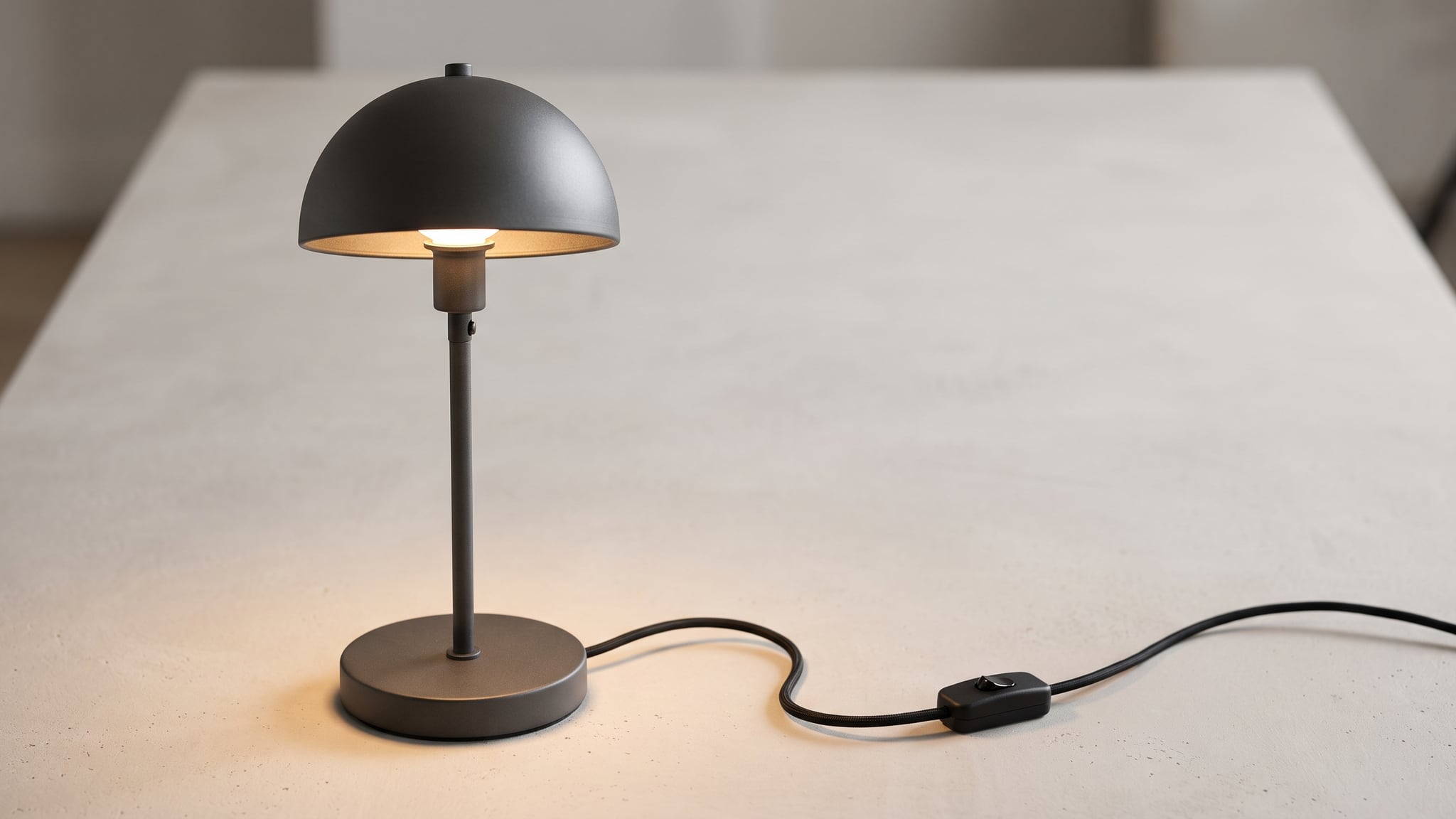
The cover is an AI-generated concept illustration of a fictional graphite corded desk lamp with an inline switch. It is not a real product photograph, a Philips Hue product, or a test of light output or operation.
What functional accuracy means in an AI product video
Functional accuracy means that the depicted behavior agrees with the documented operation of the exact product. The question is not simply whether a hand looks natural. It is whether that hand uses the real control, in a supported way, to produce the right response.
Separate three kinds of shot before writing a prompt:
- Appearance shot: shows the product, perhaps already operating in a verified state.
- Function illustration: depicts a supported action, such as pressing a power button and seeing an indicator change.
- Performance demonstration: claims something measurable, such as charging speed, light output, or battery endurance.
A generated illustration cannot establish a measured result. A glowing tabletop does not verify a lamp's brightness specification, and a rapidly filling battery icon does not demonstrate charging speed.
This is a different review from checking hidden surfaces in an AI product rotation video. Geometry can pass while the function fails. It also adds a different decision to product-ad storyboarding: whether the action itself is supported, rather than where the shot belongs in an edit.
Build an evidence pack for the exact model
Start with the product identity, including its model number and relevant version. Similar-looking lamps may use a mechanical switch, a touch sensor, a remote, or an app. Similar connectors do not establish interchangeable functions.
Collect four kinds of reference:
- Manufacturer documentation: the correct product page, manual, and support instructions for the feature shown.
- Real visual references: the actual control, connection, power arrangement, and relevant indicator states.
- A real action reference: footage of the intended operation when contact, sequence, or timing matters.
- A bounded message: one sentence saying what the finished shot should communicate, without unsupported performance claims.
Use manufacturer information for what the device supports; use actual footage to inspect how the chosen operation appears. A specification sheet may establish dimming capability without documenting the exact visible transition your shot needs.
For example, the Philips Hue Go portable table lamp product page lists a battery, a charging base, an on-product switch, and app connectivity. Its FAQ describes specific button interactions for scenes and color selection. Those details would belong in an evidence pack for that exact model. They do not authorize portraying every desk lamp as rechargeable, touch-controlled, or color-changing.
The same page distinguishes standby behavior from battery-saving sleep behavior. That is a useful reminder: an apparently simple “turn it on” scene may depend on the device's starting state. Do not copy instructions from a neighboring model because its photograph looks similar.
Mark missing information as unknown. If you cannot verify whether a control produces a beep, leave the beep out of the proposed demonstration until you can check it. An invented sound should not become your reference for the next generation.
Use a causal-state approval template
The following is our original editorial template. Keep it in your production document beside the source references. It is a planning and review aid, not a product certification or an automatic accuracy check.
| Field | What to record before generating |
|---|---|
| Product and intended message | Exact model; the single function the viewer should understand |
| Evidence | Manufacturer links and filenames of real photos or action footage |
| Prerequisites | Required power, charge, accessories, pairing, or operating mode |
| Starting state | What is on, off, connected, moving, or illuminated initially |
| Trigger | The real control and the supported user action |
| Ordered response | What changes after the trigger, in what order |
| Ending state | What should remain stable after the response |
| Unchanged conditions | Power connections, selected mode, and other conditions the action must preserve |
| Sound | Verified operational sounds; separate music and editorial effects |
| Rejection conditions | Unsupported behavior that makes the clip unusable |
| Approval record | Reviewer, clip version, decision, and unresolved questions |
Filled example: a fictional corded desk lamp
Suppose a fictional product brief defines a graphite lamp with a visible cord and an inline rocker switch. It has one fixed light setting and no battery. These are hypothetical specifications for this example, not facts about a commercial product.
The intended message is “the inline switch turns the lamp on.” The lamp starts connected to power but unlit. A hand operates the rocker once; the light then turns on and remains steady. The power connection remains unchanged throughout. Sound is left for separate review rather than adding a decorative electronic chime.
Reject a take if touching the shade activates it, the lamp glows before the rocker moves, the cable disappears, or the output cycles through colors. Even if the final illuminated frame is attractive, the preceding action has taught the viewer something false about this fictional specification.
For a real lamp, replace every hypothetical fact with documented evidence. If the switch is outside the chosen frame, decide whether to reframe, show a simple already-on appearance shot, or capture the operation directly. A hidden trigger cannot demonstrate which control was used.
Turn the approved behavior into a narrow prompt
Runway's image-to-video guidance assigns composition and appearance to the source image and recommends clear motion-focused text, beginning with a simple request. Google's video-generation best practices likewise recommend a focused moment for a short clip and motion-oriented prompting for image-to-video.
Together, those principles support a useful production choice: request one already-verified state or one bounded transition. They do not guarantee that a generator understands the device's operating rules.
Begin with a source frame that matches the intended starting state. An already-glowing lamp is a poor starting point for a clip meant to show it unlit before activation. Correct the source or change the shot; adding contradictory instructions does not supply missing evidence.
These are untested starting prompts for the fictional corded lamp. Adapt them to your verified references and the controls your chosen mode actually offers.
Option A: hold an established operating state
The camera makes a gentle push toward the lamp. The lamp stays stationary and illuminated at a steady level throughout the continuous shot. The visible cord and inline switch remain in place. The existing pool of light stays stable on the desk.
This shot communicates appearance while operating. It does not demonstrate activation, dimming, or battery operation. Still inspect the result for unintended changes in light, power connections, and controls.
Option B: show one supported transition
Locked camera on the unlit lamp and its visible inline rocker switch. The hand operates the rocker once. After the rocker moves, the lamp illuminates and remains steadily lit. The cord stays connected and stationary. One continuous view of the action and its result.
The source needs to show the relevant switch clearly. Keep this as an illustration experiment until you have compared the whole action with the real reference. If the purpose is to teach exact operation, use actual demonstration footage rather than relying on a plausible generated gesture.
You can explore an approved source and a restrained motion request in Oxava's studio. Check the selected video mode's available inputs and controls first; keep the evidence pack and approval record in your own production document. For broader shot vocabulary, use our cinematic AI video prompting guide.
Review cause and effect across the whole clip
Watch the clip at normal speed, then scrub through it in a suitable player or editor. Record the moments where the starting state, trigger, response, and stable ending become visible. Inspect the frames between those moments too; correct endpoints do not establish a correct transition.
Check power and control first
Follow the required power arrangement throughout the action. A corded-only device should not acquire apparent battery operation when its cable vanishes. Conversely, a genuinely battery-powered device need not stop working when removed from its charger. The exact product evidence determines the rule.
Then inspect the control. Does the hand contact the actual switch? Does a mechanical part move as intended? Is a short press shown where the documentation calls for a hold? For a smart device, does the depicted starting mode support the requested remote action?
If the hand obscures the whole interaction, mark the control action as unverified. The resulting light or indicator is insufficient to establish what happened behind the hand.
Check the response, not just the glow
Look for the first visible change. It should follow the approved trigger and match the reference sequence. Do not infer exact response time from generated footage.
For a lamp, examine both the light source and the illuminated surface. If the whole room gets brighter, ask whether you are seeing an exposure or grading change rather than the intended product response. A visual flourish that makes the wall glow does not establish the lamp's lighting distribution.
For electronics, compare indicators and displays with their documented meanings. The following are hypothetical review cases, not observed failures or claims about their frequency:
| Proposed clip | What must be verified |
|---|---|
| A device placed on a charging dock | Supported placement, connection, and the actual charging indicator |
| A speaker being paired | Correct control action and the documented pairing-state feedback |
| A powered fan starting | Required power, genuine control, and supported movement |
| A lamp changing brightness | Actual dimming capability and the control that changes it |
An unfamiliar indicator is a reason to check the manual, not to assume it means “ready.” Avoid generating percentages, elapsed-time counters, or comparative brightness claims as evidence of performance.
Listen for false operation
Review sound separately, including any automatically generated audio. A pairing tone, charging chime, switch click, or motor sound can imply an operation even when the picture is ambiguous.
Google's video prompting guide recommends separating audio directions into their own sentences. Apply that separation to your production brief too: identify verified product sound, background ambience, and music individually. Audio support and controls depend on the selected workflow.
Listen once without watching, then watch with sound. If a chime implies successful pairing before the connection is established, or a click seems to come from a control that never moves, revise the audio or reject the demonstration. Decorative effects should not impersonate undocumented product feedback.
Decide whether to revise, simplify, or capture the action
Use the failure to choose the next step. An incorrect starting state calls for a better source. An overcomplicated sequence calls for a smaller action. An undocumented function calls for research or removal from the brief, not stronger wording.
When a function remains inaccurate, an already-on appearance shot may serve the campaign. Change the caption and surrounding edit accordingly. Cutting from a finger approaching the wrong control to a glowing lamp can still imply that the wrong control worked.
If the buyer needs exact setup instructions, control timing, connector behavior, or a measurable result, capture the real operation. You can place that footage beside generated atmosphere shots in an external editor, provided the sequence preserves what the real demonstration establishes.
Finally, review the exported file with its captions, voiceover, sound, and cuts. Approval applies to the complete message. Keep the accepted version linked to its evidence so another editor can understand why it passed.
Frequently Asked Questions
Can AI video accurately demonstrate how electronics work?
It can illustrate a supported action, but a plausible output does not verify the action. Compare the control, prerequisites, sequence, and response with documentation and actual footage. Use real capture when exact operation is the purpose.
Does a lamp's cable always need to be visible?
No. Framing may legitimately place a cable outside the shot. The concern is whether the complete scene implies unsupported cordless operation, especially if a required cable disappears during the action.
Can I fix functional errors with a negative prompt?
A negative prompt may guide generation where the selected mode supports it, but it cannot establish product facts or guarantee compliance. First define the correct behavior and improve the source or shot scope. Review the resulting clip against evidence.
Is an AI-generated light change proof of brightness or dimming performance?
No. Generated light, exposure changes, and color grading are not measurements of a physical lamp. Documented dimming capability may support an illustration, while brightness comparisons and response-time claims require appropriate real evidence.
Approve the behavior before the polish
AI product video accuracy starts with a narrow, answerable question: does this sequence show something the exact product can do, under the conditions shown? Record the starting state, real trigger, supported response, and rejection conditions before generating.
Start a product-video concept in Oxava with an approved reference and one clear action. Keep the real product evidence beside the output, and choose actual capture whenever the job is to prove how the device works.
Oxava Team
Egemen Küpçü is the founder of Oxava, with 10+ years of hands-on experience in 3D and visual production. He writes about the craft of generating product, brand and campaign visuals with AI.
Related Articles
ALL POSTS

Subscribe to our newsletter
Be the first to hear about new techniques, model updates and ideas on AI generation.