

Your brand has a face — a mascot, a recurring spokesperson, or a UGC-style persona who "reviews" your product in every ad. You generate a great image of her — and the next one looks like her cousin. The hair is a shade darker, the jawline softer, and suddenly your campaign has two different people pretending to be one. The instinct is to assume you need to train something — a custom model, a LoRA, a fine-tune on a folder of her photos. You don't. This guide is about getting reliable AI character consistency without training anything: keeping the same identity locked across an entire shoot using nothing but reference images and disciplined prompting.
The training route is real, but it's the heavy option — time, compute, and a look you'd then have to retrain to change. For most brand and creator use cases, a reference-first workflow gets you there in minutes. This guide covers why characters drift by default, the no-training method step by step, the prompt anchors that hold identity across scenes, how to pick the right model, and a QA checklist that keeps a full campaign from falling apart.
What character consistency means — and what it's not
Character consistency is about a person: keeping the same identity — face, bone structure, hair, build, and signature details like a scar, glasses, or a distinctive jacket — from one image to the next, no matter where they are or what they're doing. If a stranger could line up ten images and say "that's the same person," you have it. If they'd guess "siblings, maybe," you don't.
This gets confused with two neighboring disciplines, and separating them up front saves you from reaching for the wrong technique:
| What you're locking | Stays constant | Free to change | Covered here? |
|---|---|---|---|
| Character identity (this guide) | A person — face, body, hair, signature features | Scene, pose, lighting, often the outfit | Yes |
| Brand style | The look — palette, lighting, mood, finish | The subject and scene entirely | No |
| Product variant | A product's shape and geometry | Color, angle, finish | No |
Brand style is about every image feeling like the same company made it — same palette, light, and grade — even when subjects differ. That's a systems problem, solved with a fixed style block and covered in the AI image brand consistency guide. It's not this: two images can be perfectly on-brand and still show two different people.
Product variant consistency keeps one object stable while its color or angle changes — the red shirt matching the blue in a catalog. That's consistent product variant images, and it's not this either: a product has no face to drift; a person does, and faces are where the entire difficulty lives.
So keep the frame narrow: here, the thing that must not change is a human (or character) identity, and everything else is free to move.
Why the same character drifts by default
To fix drift, know why it happens — it isn't a bug. A text-to-image model has no memory: each generation starts from fresh noise and builds a person who matches your words, not one it has met before. "A 30-year-old woman with brown hair" describes millions of faces, and the model picks a different one every run. Nothing carries over unless you force it to.
That randomness shows up as a few recurring failure modes — the same pitfalls general character-consistency guides keep flagging (see the gensgpt guide and invideo's overview):
- Identity drift. The slow slide across a set: nose, eyes, and apparent age each nudge a little. No single image looks wrong; the series does.
- Attribute bleed in multi-character scenes. Two characters in one frame and the model trades features between them — a jacket color migrates, eye color swaps — a well-documented weak spot in how features mix across subjects.
- Pose degradation. Anything beyond a neutral front portrait — a three-quarter turn, profile, or rear view — gets shakier: less face to anchor on means more invention, and invention is where the person changes.
- Hair and face drift most. They carry the most identity information and are least constrained unless you pin them down — what makes a viewer say "that's not her."
The through-line: anything you leave to the model, the model re-rolls. Consistency is the practice of leaving as little to chance as possible.
AI character consistency without training: the reference-first method
Here's the core idea: instead of describing your character in words and hoping the model lands on the same face twice, you show it the face and tell it to reuse that identity. The reference image is the anchor; the prompt only controls what changes around it — which is why you don't need a LoRA. A reference image does in seconds what a fine-tune does in hours.
How well it works scales with how much of the character you give the model to lock onto.
One reference photo is the entry point — often enough for front-facing, portrait-style scenes. Upload a clean, sharp, well-lit shot and the model carries that identity into a new background or outfit. The limit shows the moment you want a different angle: a single front shot tells the model nothing about the profile or back of the head, so it guesses — and guessing is drift.
A multi-angle reference sheet is the upgrade that unlocks real range, and it's exactly what reference-sheet tutorials recommend for holding a character together (the Nano Banana Pro reference-sheet walkthrough is built around this). Instead of one photo, assemble a small set showing the same person from several viewpoints:
- a front view (neutral, clean),
- a three-quarter (45°) view,
- a profile (side) view,
- a back or rear-three-quarter view,
- and at least one close-up for fine facial detail.
With that coverage, the model has seen your character from every side a scene needs, so a profile shot in a café or a rear view down a street isn't invented — it's recalled.
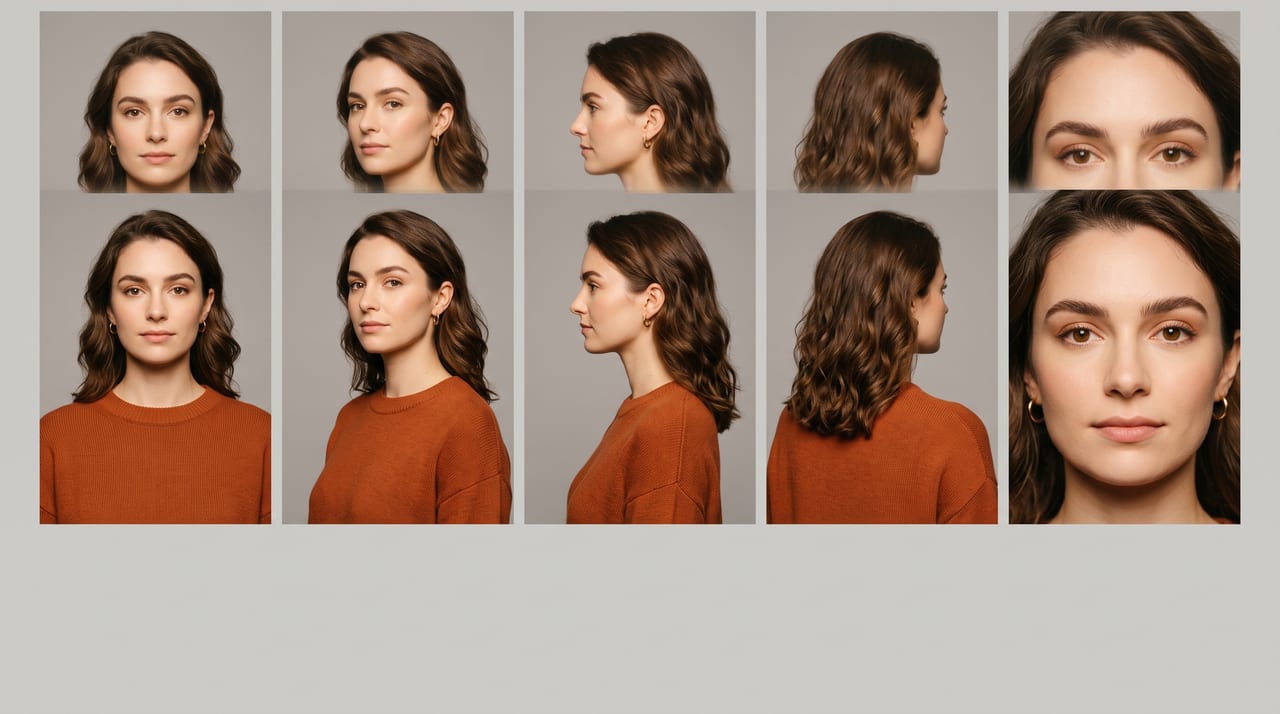
How many references is enough? More isn't automatically better — a handful of clean, consistent, high-resolution references beats a dozen mediocre ones that disagree. For most persona work, three to five well-chosen angles is the sweet spot. Feeding contradictory references (different haircuts, weights, photos from years apart) teaches the model your "character" is a fuzzy average — and averages drift.
The model that ties this together is Ref → Anchor → Scene: the reference is your source of truth for identity, the anchor is the subset you attach to a given generation, and the scene is everything you're free to change on top. Lock the first two, vary the third, and you have a repeatable machine instead of a lucky roll.
Prompt anchors and negative prompts that hold identity across scenes
References do the heavy lifting; the prompt keeps them honest as you push into more varied scenes. Two techniques do most of the work.
Write a character bible (an identity anchor block)
Borrow an idea from film and animation: a character bible is a short, fixed description of your character's non-negotiable features, pasted into every prompt unchanged. It's the text twin of your reference sheet — it re-states in words what the model most likes to drift on: hair and face.
A good anchor is concrete and locked:
Identity anchor (fixed every time): "Maya — 32-year-old woman, warm olive skin, sharp defined jawline, deep brown almond eyes, shoulder-length dark brown wavy hair with a center part, small silver hoop earrings, faint beauty mark on left cheek."
It pins hair (length, color, texture, part) and face geometry in exact language, plus a signature detail or two that act as an instant visual fingerprint. Keep the anchor verbatim; only the scene half changes:
❌ Drifts (no anchor): "A woman drinking coffee in a bright kitchen"
✅ Holds (anchor + scene): "[identity anchor] + drinking coffee in a bright modern kitchen, morning light, candid lifestyle photo"
This is the layered-prompt discipline from our pillar guide on how to write AI image prompts, applied to a person: freeze the identity layer, vary only the scene layer. Paired with the reference sheet, you constrain the model from both directions — image and text agreeing on the same face.
Keep the rendering style locked too — a consistent face in a wildly different treatment still reads as "off." If your persona lives in warm lifestyle photography, don't let one image come back as a 3D render; our guide to style prompts covers the keywords that hold the look steady alongside the identity.
Use negative prompts to fence off drift
On models that support them, negative prompts guard against specific ways a face
goes wrong — terms like different person, inconsistent face, younger, older, wrong hair color, extra facial features push back against aging up, ethnicity
drift, or an unwanted beard. Not every model has a negative field, as our
negative prompts guide covers;
on ones that don't, describing the correct identity positively (your anchor
block) does the same job.
When one image drifts, edit rather than re-roll
Sometimes 90% of a generation is perfect and only the face slipped. Don't gamble on a fresh roll — fix it in place. An image-to-image edit corrects the face or swaps in the hair on an otherwise-great frame, far more reliably than hoping the next roll nails the whole scene and the identity. Our image-to-image editing workflow walks through exactly this kind of targeted correction.
Picking a model built for character consistency — and using multiple references at once
Technique gets you far, but the model underneath sets your ceiling — models differ enormously in how tightly they hold an identity, how well they take multiple reference images, and how they behave when a character turns away from the camera. Two capabilities matter most:
- Strong identity retention — the model keeps a face stable across pose and lighting changes instead of quietly re-rolling it.
- True multi-reference input — accepting several reference images in one generation, so your multi-angle sheet reads as one coherent identity, not a lonely headshot.
That second capability is where Oxava is built to help. The Oxava Studio composer accepts multiple reference images in a single generation — front, three-quarter, and profile shots at once — paired with models chosen for character and multi-subject consistency. Nano Banana 2 is the strong default for holding a person together across scenes; Nano Banana Pro is the premium option for the highest face fidelity and complex multi-character frames. Upload the reference sheet, write your identity anchor plus the scene, and generate — no LoRA, no fine-tune, no training job. It's also the best defense against attribute bleed: give each person in a multi-character frame their own clean reference so the model attaches a distinct identity to each body instead of averaging them into lookalikes.

Running it across a full campaign without drift: a QA checklist
A single consistent image is easy. A campaign — twenty, forty, a hundred images of the same person — is where tiny drifts compound. Run every generation through this before it ships:
- Face check. Compare directly against your reference sheet, not memory — jawline, nose, eye shape and color, age.
- Hair check. The most common drift: confirm length, color, texture, and part still match.
- Signature-feature check. Glasses, earrings, a beauty mark, a tattoo — a missing signature is an instant tell.
- Logo / branded-item check. If your character wears a branded item, zoom to 100% and confirm the logo is legible, not a melted approximation.
- Side-by-side test. The decisive one: place the new image next to two approved ones. If it reads as the same person, it passes. If it reads as "a relative," regenerate with a tighter anchor or an extra reference angle.
One rule saves whole shoots: when the costume or key props change substantially, refresh your reference set. A sheet of your character in a red jacket will fight a formalwear brief, because the model anchored to the jacket as part of the identity. Generate a clean new set in the new wardrobe — holding face and hair constant — approve it, and use that as the sheet for that segment.
When an image fails, fix the recipe, not just that frame — a loose anchor, a missing angle, an off-brand style. Fixing the system prevents the next ten failures.
Frequently Asked Questions
Do I need to train a LoRA or custom model for this?
No. Training is the heavy, slow route — a dataset, compute time, and a retrain every time the look changes. A clean multi-angle reference set plus a model with strong identity retention gets most brand and creator work to consistent results in minutes; training only pays off at massive volume with pixel-level fidelity demands.
How many reference images should I use?
Three to five: a front view, a three-quarter, a profile, ideally a rear angle, and a face close-up. That coverage lets the model reconstruct your character from any angle a scene needs. Quality beats quantity — a few sharp, consistent references outperform a dozen that disagree, because contradictory references teach the model to average, and averages drift.
Will the character look identical or just similar?
Close enough that a viewer reads it as the same person — which is what "consistent" means in practice. These are generative systems, so expect "unmistakably the same person," not a forensic pixel-perfect clone in every frame. The QA checklist catches the occasional slip, and an image-to-image edit fixes a near-miss face without re-rolling the scene.
Does this work for video too, not just images?
The principle carries over: a strong reference identity keeps a character stable whether the output is a still or a clip. Video adds the challenge of holding identity across motion, so it's more demanding — but the reference-first mindset and a consistency-focused model are the same foundation. Nail it in images first.
Keep your character consistent — start in the studio
AI character consistency without training comes down to five things: a clean multi-angle reference set, a fixed identity anchor in every prompt, negative prompts (or precise positive framing) to fence off drift, a model built to hold an identity, and a thirty-second QA check before anything ships. That's the whole method — reference-first, no LoRA, no fine-tune, no waiting.
The fastest way to feel the difference is to run one loop end to end. Gather three to five reference photos of your character, upload them together into the Oxava Studio composer, write your identity anchor plus a fresh scene, and generate a small set — the composer takes all your references at once and pairs them with Nano Banana 2 (or Nano Banana Pro for the highest face fidelity), so the same person comes back in every frame. Watch your persona hold together across a kitchen, a street, and a studio without a single training run, and you'll have a repeatable way to give your brand a face that stays the same.
Egemen Küpçü
Egemen Küpçü is the founder of Oxava, with 10+ years of hands-on experience in 3D and visual production. He writes about the craft of generating product, brand and campaign visuals with AI.
Related Articles
ALL POSTS


Subscribe to our newsletter
Be the first to hear about new techniques, model updates and ideas on AI generation.