

The most useful thing about AI product photos for Etsy is that one decent phone shot of your actual item can fill an entire listing gallery — twenty slots of styled scenes, seasonal setups, and in-use frames, without booking a studio or buying a single prop. The catch is that Etsy is not a marketplace where you can generate your way out of reality.
Two things make Etsy different. First, the buyer isn't an Amazon buyer scanning a grid of white cutouts for the cheapest option — they came for something made by a person, and the photography that converts looks warm, textured, and slightly imperfect on purpose. Second, and more seriously: on a handmade listing there's a standing expectation that what you photograph is the thing that ships.
So this guide covers where staging your product with AI ends and changing it begins, what Etsy's image specs are generally understood to ask for, how to fill all twenty slots deliberately, and a workflow that turns one honest photo into a full gallery.
Before You Make AI Product Photos for Etsy: What the Platform Expects
Almost every seller asks the wrong question first: not "am I allowed to use AI?" but "does this photograph represent the item the buyer will receive?"
The line isn't "AI or not" — it's "is this the item the buyer receives?"
Marketplace photo standards, Etsy's included, are generally understood to be built around accuracy rather than tooling. Nobody is auditing which app you opened. What matters is whether a buyer holding your parcel would feel the photos told the truth: same color, same texture, same size, same construction. That reframe gives you a boundary you can apply item by item:
- Changing what's around the product — background, lighting, surface, props, styling, crop — is staging. Photographers have done it with seamless paper and reflectors forever; AI just makes it cheap.
- Changing the product itself — its color, texture, shape, adding a detail it doesn't have, removing a flaw it does — is a different act. Now the photo describes an object that doesn't exist in your shop.
Here's the practical matrix:
| Safe (staging) | Risky (be careful) | Don't |
|---|---|---|
| Replacing or generating a new background | Boosting saturation until the color reads differently | Generating a variant color you don't actually stock |
| Fixing exposure and white balance | Sharpening texture so a weave or grain looks finer than it is | Faking an on-model shot for a garment you never photographed on a person |
| Building a styled scene with props and surfaces | Erasing marks that are genuinely part of the item | Rendering the product entirely in AI and presenting it as a photo of real stock |
| Adding a realistic contact shadow | Rescaling the product so it reads larger or smaller | Adding a detail — a clasp, a stitch, an engraving — that isn't there |
| Cropping, straightening, extending the canvas | Smoothing away handmade irregularities buyers expect | Showing a finish (gold, glaze, stain) you don't offer |
| Upscaling for resolution | Compositing a set that implies more pieces than ship | Implying materials or dimensions the listing doesn't match |
The middle column is where honest sellers get into trouble, because the edits feel cosmetic. A color grade that turns your sage-green mug mint isn't a style choice to the buyer who unwraps a mint mug they didn't order — it's a color mismatch, and that's one of the most common causes of handmade returns and bad reviews.
Where Etsy's AI rules actually live
Here's the part sellers routinely conflate. Etsy's published expectations around AI are generally understood to sit inside its Creativity Standards, and to concern what you're selling more than how you photographed it — the framework distinguishes roughly between an item made by a seller (physical work you produce) and one designed by a seller (where creative input and any AI involvement in the design come into play). The disclosure conversation in seller forums is largely about that second bucket: AI-generated designs, prints, and digital products.
Photo editing is a quieter case. Sellers widely report that ordinary retouching and background work has never been treated as something to declare, and photography guides covering Etsy describe the expectation in similar terms: edits are fine as long as the listing images still represent the real item accurately. That's a paraphrase of how those guides characterize it, not a quotation of Etsy's own wording.
Please verify the current wording yourself before you list. Etsy's policy pages are the only authoritative source, they change, and a summary written in July 2026 is no substitute: read Etsy's Creativity Standards and confirm the current requirements apply to what you're doing.
Disclosure: when in doubt, say it
If your listing photos are staged versions of a real item you make, sellers generally treat that as ordinary photography and don't disclose it. If AI contributed to the design of what you're selling — a generated print, pattern, or digital file — disclosure is the widely discussed norm and, in that bucket, the thing Etsy's standards are generally understood to care about.
Between those poles, err toward saying it. A line in your description — "product photos are styled digitally; the item ships exactly as described, in the dimensions and colorway listed" — costs nothing and pre-empts the "this looks different than the photos" message. Etsy has not, as far as we can verify, issued explicit guidance requiring you to declare photo editing, and we won't pretend otherwise. Transparency here is a trust decision more than a compliance one, and on a handmade shop trust is the asset.
Etsy Listing Photo Size and Image Specs (the 10 → 20 Change)
In August 2025, Etsy raised the per-listing photo limit from 10 to 20 — a meaningful change most sellers still haven't caught up with. Ten slots meant choosing between angles and lifestyle; twenty means you can show angles, scale, texture, process, packaging, and seasonal context without cutting anything.
The spec set below is what listing tools and seller-facing guides — List Perfectly and Outfy publish essentially the same numbers — consistently report:
| Spec | What to target |
|---|---|
| Shortest side | 2000 px or more recommended (absolute minimum around 635 px) |
| Recommended size | 3000 × 2250 px, or 2000 × 2000 px for square |
| Aspect ratio | 4:3 or 1:1 — the first image should be horizontal or square |
| File formats | JPG, PNG, GIF — WebP is not accepted |
| File size | Under 1 MB per image |
| Color profile | sRGB |
| Thumbnail | Rendered around 570 × 456 — your hero gets cropped, compose for it |
| Photos per listing | Up to 20 (raised from 10 in August 2025) |
| Video | 5–15 seconds, MP4 or MOV, ≤100 MB, 1080 px or more, one per listing — audio reportedly stripped |
These numbers are the ones third-party guides and listing tools consistently report, and platform requirements change. Confirm the current image and video requirements in Etsy's own seller documentation before you upload.
Two of these bite. WebP not being accepted catches people whose AI tool exports WebP by default — check your export format before you batch a gallery. And the thumbnail crop squeezes your hero into roughly 570 × 456 in search results: a product sitting small in a beautifully composed wide frame disappears at that size. Compose the hero tight, then let the wider storytelling happen in slots 6 through 20.
The 2000 px recommendation is where AI output often falls short — many models return closer to 1024 px on the short side, which looks soft when a buyer zooms. Upscaling is the fix, and our AI image upscaling guide covers doing it without smearing texture — which matters when the texture is the selling point.
Why the Amazon Playbook Fails on Etsy
If you also sell on Amazon, unlearn most of it before you touch your Etsy gallery. Amazon's main image standard is strict and mechanical: pure white at RGB 255, 255, 255, no props, no text, product filling at least 85% of the frame. It's enforced automatically, and near-white is a violation, not a near-miss — our marketplace white-background standards guide covers hitting that fiddly technical target.
Etsy sits at the opposite pole. No equivalent white-background requirement is reported for Etsy listings, and styled, contextual photography isn't merely tolerated there — sellers and photography guides describe it as the platform's native visual language. The consequence is worth sitting with: the same warm lifestyle frame that wins on Etsy would be a policy violation as an Amazon main image, and the sterile white cutout that's mandatory on Amazon reads as cold and mass-produced on Etsy. Two different photographs of the same object. If you sell in both places, make both; don't reuse across them.
The Etsy aesthetic vocabulary
If Amazon's aesthetic is "prove it's the product," Etsy's is "prove a person made it." That translates into concrete, promptable choices:
- Warm, directional natural light. Soft window light with visible falloff and a real shadow, not flat studio fill. Late-afternoon warmth over midday neutral.
- Natural materials as surfaces. Linen, raw wood, unbleached paper, stone, ceramic, wool — texture under the product, not a seamless white sweep.
- Traces of the maker. Hands in frame, a workbench with tools, a dusting of clay. Process reads as proof.
- Imperfection that sells. An uneven glaze edge, a visible stitch, a wood knot. On Etsy these are features — don't let an AI pass smooth them away, which is both an aesthetic loss and a step toward misrepresenting the item.
- Seasonal and occasion framing. Gift wrap, a holiday table, a spring windowsill. Etsy buying skews heavily toward gifting, and context sells the occasion.
- Room to breathe. Negative space, a styled corner of a real home. Amazon wants 85% product fill; Etsy wants a scene the buyer can imagine living in.
Filling All 20 Slots: A Gallery Map
Twenty slots is generous enough that "I'll just add more angles" wastes it. This map covers what buyers actually ask about — and marks which slots need real photography versus which AI can legitimately stage.
| Slot | What goes there | Real photo required, or can AI stage it? |
|---|---|---|
| 1 | Hero — product clear, square/horizontal, thumbnail-safe | Real photo, AI may restyle the background |
| 2–3 | Alternate angles: back, side, underside, opening | Real photo — angles must come from your item |
| 4 | Scale reference: in a hand, next to a common object | Real photo of the product; scene can be staged |
| 5 | Material/texture macro — weave, grain, glaze, stitch | Real photo, minimal editing |
| 6–8 | Lifestyle "in use" — on a table, worn, in a room | Real product cutout, AI-staged scene |
| 9 | Process / workshop frame | Real if you have it; AI can stage a workbench context |
| 10 | Packaging and gift presentation | Real packaging; AI can stage the surface and light |
| 11–14 | Variants — colors, sizes, finishes you actually stock | Real photo of each variant. No exceptions |
| 15–16 | Info cards: dimensions, care instructions, materials | Designed graphic over a real or staged photo |
| 17–19 | Seasonal / alternate scene variations | Real product, AI-staged scene |
| 20 | Brand or shop frame — your studio, your logo, your story | Real or staged, your call |
Which slots must be real photography
The right-hand column shows the pattern: AI stages, it doesn't substitute. Slots 1–5 and 11–14 are load-bearing evidence. The hero and angles prove the object's form, the macro proves the material, and the variant shots prove that a buyer clicking "sage green, large" gets sage green, large. All of those must originate in a camera pointed at your actual item.
What AI adds is removing the cluttered kitchen background, correcting exposure, building a believable surface and shadow, and making the whole set look like one coherent shoot. That's a lot of value, and it stops well short of inventing evidence.
The Workflow: One Phone Photo to a Full Etsy Gallery
Here's the production loop — five steps, runnable on a single well-lit phone photo of your item.
Step 1 — Take one clean source photo. Near a window, indirect daylight, item on a plain surface, shot straight-on, in focus, filling the frame. This photo is your ground truth; every downstream frame inherits its color and texture. Shoot your angles and variants in the same session while the setup is up.
Step 2 — Separate the product from its background. Remove the original background to get a clean cutout with an honest edge — a ragged mask contaminates every scene you build afterward. Background removal is available on every Oxava plan including Starter, and our background removal and replacement guide covers the hard edges: hair, transparency, fringe.
Step 3 — Generate the Etsy-appropriate scene. Use your product photo as a reference image and instruct the model to build a new environment around it while leaving the product untouched. Reference-image editing works from the Starter plan up, across models including Nano Banana 2, Seedream 5 Pro, GPT Image 2, Ideogram 4, Recraft V3, and Grok Imagine. Four prompts to paste and adapt — the locking sentence at the end of each does the most important work:
Sunlit craft-fair / linen-and-wood scene: "Place the product on a natural oak table with a soft linen runner, warm late-afternoon sunlight coming from the left through a window, gentle directional shadows, a few dried eucalyptus stems out of focus in the background, shallow depth of field, cozy artisan market atmosphere, photorealistic, keep the product's shape, color, and texture exactly as in the reference image."
Cozy home-interior in-use shot: "Show the product in use in a lived-in home interior — a warm neutral room with a soft wool throw, a stack of books, and morning light from a nearby window, natural imperfect styling, slightly desaturated warm color grade, photorealistic lifestyle photography, keep the product's shape, color, and texture exactly as in the reference image."
Maker's workbench process frame: "Place the product on a well-used wooden workbench surrounded by the tools of its craft, fine dust and material offcuts scattered naturally, warm overhead workshop light with soft falloff, a sense of work just finished, documentary photography style, photorealistic, keep the product's shape, color, and texture exactly as in the reference image."
Seasonal gift-wrap flat lay: "Top-down flat lay of the product on textured kraft paper with natural twine, a sprig of greenery, and a small handwritten gift tag, soft even daylight with gentle shadows, muted seasonal palette, generous negative space, photorealistic flat lay photography, keep the product's shape, color, and texture exactly as in the reference image."
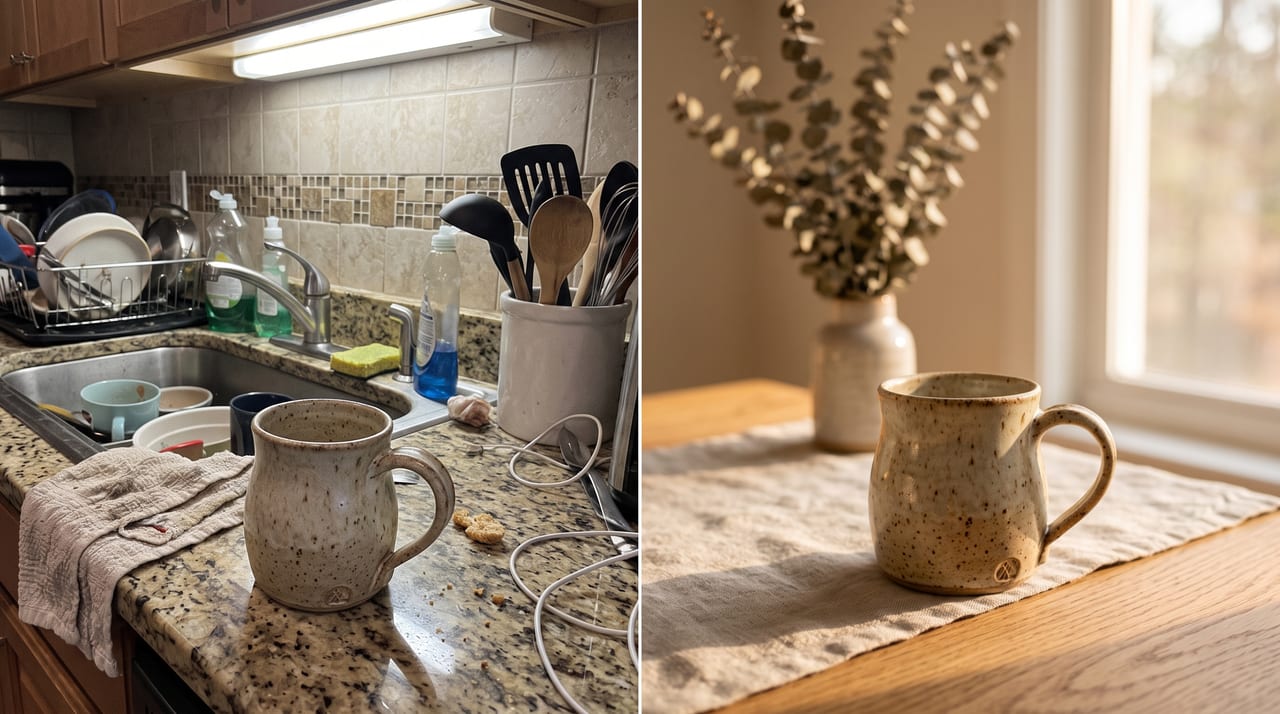
Step 4 — Vary the scene, not the product. Re-run the same reference with different surfaces, seasons, and light directions to build out slots 6–8 and 17–19. That's how a gallery reads as one coherent shoot instead of twenty unrelated pictures. Our AI lifestyle images guide covers scene-building in depth; if you also run a Shopify store, the Shopify product photography AI workflow walks the same pipeline end to end for a full catalog.
Step 5 — Hit resolution and export (Pro-tier step). Get each final image to 2000 px or more on the short side, under 1 MB, in sRGB JPG or PNG. If your generations come out below that, image upscaling on Oxava requires a Pro plan or higher — worth knowing before you build a workflow around it. On Starter, generate at the largest size your chosen model supports and export carefully.
A guardrail worth reading twice. Two techniques in our library are genuinely useful for Etsy staging and genuinely easy to misuse here. Variant images with color and angle consistency is for keeping variants you already photographed visually consistent — not for generating a colorway you don't stock. On-model apparel photos from flat lays is for presentation — but on a handmade listing, an on-model frame of a garment you never photographed on a person is a shot the buyer will reasonably read as real. Both cross into misrepresentation the moment they generate evidence rather than stage it. Use them for the scene; keep the proof real.
Your One Video Slot
Etsy listings support a single video each, and it's underused — which makes it a cheap differentiator. Two constraints shape everything: it runs roughly 5 to 15 seconds, and the audio is reportedly stripped on upload. No voiceover, no music, no talking — plan for it to work silently.
Three formats reliably do: a slow 360° turn of the product on a surface; an in-hand shot that establishes real scale and how it feels to hold; and an unboxing that shows your packaging, which for gift buyers is half the purchase. Keep motion slow and the product centered — fast cuts read as noise without sound to carry them.
If you'd rather animate a photo you already have than film something new, our guide to turning product photos into videos covers keeping motion subtle enough that the product stays believable.
Getting Images Into Your Etsy Shop (Honest Note)
To be direct: Oxava has no Etsy integration. Nothing publishes to your shop, nothing syncs, nothing bulk-uploads. The pipeline is manual and short — generate and download your images, then go to Shop Manager → Listings → your listing → Photos and upload them. Drag to reorder; slot 1 is your thumbnail.
Two things to handle on the way out. First, compress to under 1 MB — a 2000
px upscaled JPEG often lands above the limit, and any standard compressor gets it
under without visible loss. Second, name your files descriptively
(handmade-sage-ceramic-mug-lifestyle.jpg, not gen_0047.jpg) and fill in the
per-photo alt text where Etsy offers the field; both feed accessibility and
search, and both take seconds at export. For a large catalog, Etsy's own bulk
tools and third-party listing managers handle volume — that's their job, not an
image generator's.
Frequently Asked Questions
Can you use AI-generated images on Etsy?
The useful distinction isn't AI versus not-AI — it's whether the photo represents the item the buyer receives. Using AI to change what's around your product (background, lighting, scene, props) is generally understood as ordinary photo staging. Using AI to change the product itself — its color, texture, shape, or details — or to depict an item you don't actually stock moves toward misrepresentation. Etsy's published standards are generally understood to focus on the item and its creation rather than on photo editing specifically, so read Etsy's Creativity Standards and confirm the current wording against what you're planning before you list.
Do I have to disclose that I used AI to edit my Etsy listing photos?
Separate the two cases. If AI contributed to the design of what you're selling — a generated print, pattern, or digital file — disclosure is the widely discussed norm and the area Etsy's standards are generally understood to address. If you only used AI to stage or retouch photos of a real item you make, sellers widely report that this has been treated as normal photo editing rather than something to declare. As far as we can verify, Etsy has not published explicit guidance requiring disclosure of photo editing — so if you're in any doubt, do both: add a short honest line to your description, and confirm the current requirements on Etsy's own policy pages before you list.
How many photos can an Etsy listing have?
Up to 20 per listing. This changed in August 2025 — the limit was previously 10 — and many shops still have galleries built for the old cap. If yours does, those ten extra slots are free real estate for scale references, process shots, packaging, info cards, and seasonal scenes. Listings also support one video.
What size should Etsy listing photos be?
Aim for at least 2000 px on the shortest side, with 3000 × 2250 px (4:3) or 2000 × 2000 px (1:1) as solid targets, kept under 1 MB in sRGB. Use JPG or PNG — WebP isn't accepted, which trips up sellers whose AI tool exports WebP by default. The search thumbnail renders around 570 × 456, so compose your first image tight enough to survive that crop. Confirm the current requirements in Etsy's seller documentation, since specs do get updated.
Does Etsy require a white background like Amazon?
Not in the way Amazon does — the single biggest habit to unlearn if you sell in both places. Amazon's main image requires pure white at RGB 255, 255, 255 with no props and 85% product fill, enforced automatically. No equivalent white-background requirement is reported for Etsy, where styled, contextual photography is the norm. So build separate images for each platform: our marketplace white-background guide covers the strict Amazon side; this article is the other pole.
Build Your Etsy Gallery in One Session
The honest summary of AI product photos for Etsy: it's a staging tool, not a manufacturing tool. It can take one real photo of one real item and give you twenty coherent, warm, well-lit frames showing that item in context, at scale, in packaging, across seasons — the gallery you'd have paid a photographer for. What it can't ethically do is generate the item, the colorway, or the proof. Keep the product real, stage everything around it, and you're on solid ground.
The practical move is to block out one session. Photograph your item and its variants near a window, then take the best shot into the Oxava studio: remove the background, use the photo as a reference, and put the locking phrase — keep the product's shape, color, and texture exactly as in the reference image — in every prompt. Background removal and reference-image editing are available from the Starter plan; upscaling to the 2000 px target needs Pro or above. Then download, compress under 1 MB, and upload to your listing manually.
Before you publish, check once more against Etsy's Creativity Standards and the current image requirements — policies move, and this guide is a starting point, not the authority. Then open the Oxava studio and fill those twenty slots. For the wider picture of building a whole catalog this way, our AI product photography guide ties it together.
Egemen Küpçü
Egemen Küpçü is the founder of Oxava, with 10+ years of hands-on experience in 3D and visual production. He writes about the craft of generating product, brand and campaign visuals with AI.
Related Articles
ALL POSTS
Subscribe to our newsletter
Be the first to hear about new techniques, model updates and ideas on AI generation.